Singapore parenting, practical reviews and tech notes

iPhone Video Audio Sounds Muffled? Check This Before Blaming Your Microphone

If your iPhone video audio sounds muffled, distant or strangely poor, you might naturally assume that something is wrong with the microphone.

Before resetting your phone, changing a dozen settings or arranging a repair, however, there is one ridiculously simple thing worth checking — especially if you have installed a transparent protective film on the back or around the camera area of your phone.

I recently helped troubleshoot an iPhone 17 Pro with muffled audio when recording videos. The phone otherwise appeared to work normally, and the usual software updates and troubleshooting didn’t solve the problem.

After researching many reports from people experiencing similar video recording audio problems — with all sorts of different suggested causes — we eventually found one that matched.

A tiny, perfectly circular piece of transparent protective film was still covering one of the phone’s microphone openings.

And it was remarkably difficult to notice.
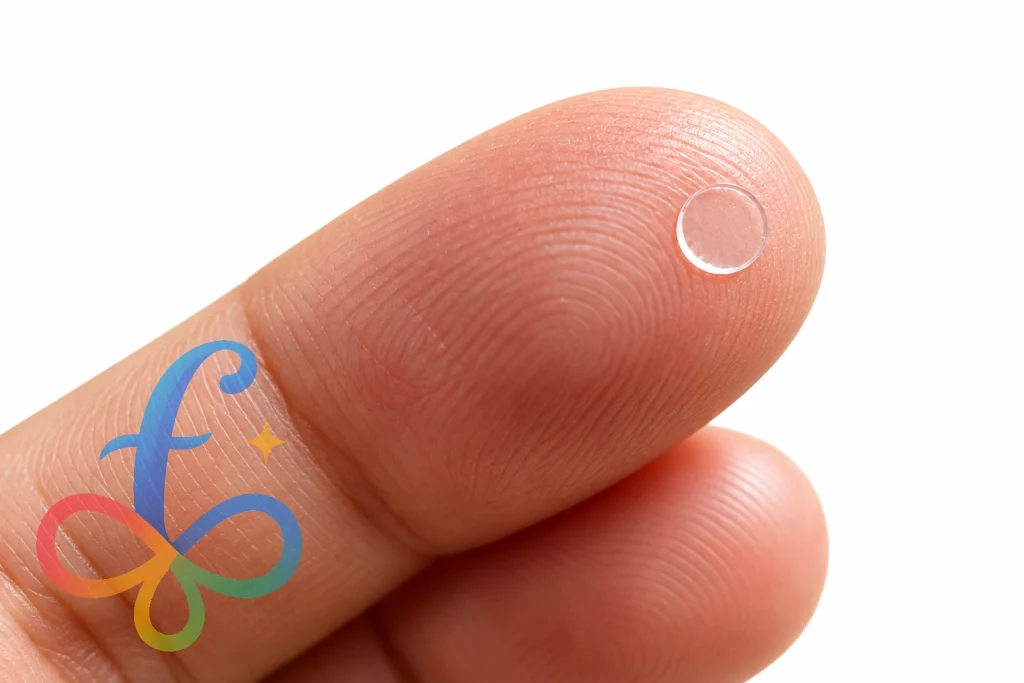
protector cutout caused the audio muffled video on iPhone 17

The problem was the protective film — but not in the way you might expect

Some transparent rear protectors and camera-area protective films are manufactured with precisely cut openings for the phone’s cameras, flash, sensors and microphones.

At first glance, that sounds perfectly fine. The protector isn’t supposed to cover any of those components.

But here’s the catch.

Just because the manufacturer has cut a tiny circle into the film doesn’t necessarily mean that the circular piece will come away when the protector is installed.

The main protective film can be applied successfully while one of those tiny transparent cutout pieces remains stuck in place.

If that happens over a microphone opening, you can end up with a microphone that is physically covered by an almost invisible layer of plastic.

Because the cutout is tiny, transparent and perfectly round, it may not look like an accidental obstruction at all. Once the phone is inside a case, it becomes even easier to overlook.

Why would this make your iPhone video audio sound muffled?

A microphone works by responding to sound waves travelling through the air. Put a layer of plastic directly over its opening and you interfere with how those sound waves reach the microphone.

The confusing part is that the microphone may not stop working completely.

Your video can still have audio.

It may simply sound muffled, distant, dull or noticeably worse than it should.

That makes this problem particularly misleading. If the microphone were completely dead, diagnosing a hardware problem would be relatively straightforward. When it still records sound — just badly — it is easy to start looking for software bugs, camera settings, noise processing problems or microphone hardware failures.

Sometimes the microphone is perfectly fine.

It just has a tiny piece of plastic sitting over it.

What should you check?

If your iPhone video recordings have muffled or poor-quality audio, inspect the area around the rear cameras carefully before doing anything drastic.

This is particularly worth checking if you have ever installed:

  • A transparent rear phone protector
  • A camera-area protective film
  • A camera lens protector
  • A skin or transparent wrap
  • A phone case that closely surrounds the camera module

For an idea of the type of transparent rear protector involved, here is a general example of a back protector. Check its camera and microphone cutouts carefully during installation.

Look for the phone’s microphone openings and make sure that every opening that is supposed to be exposed really is exposed.

Don’t assume that seeing a perfectly round circle means you’re looking at an open hole. You may actually be looking at the edge of a transparent cutout that is still attached.

The leftover piece can be extremely difficult to see

The piece we eventually removed was tiny.

Once separated from the phone, it became obvious what had happened: it was the small circular piece created when the protector manufacturer cut the microphone opening.

While it was still attached to the phone, however, it blended into the surrounding protector surprisingly well.

Try shining a bright light across the surface at an angle rather than looking directly at it. Reflections along the edge of the film can make a leftover cutout much easier to spot.

You can also compare the microphone opening against photographs of an unprotected version of your phone to see whether something appears to be covering it.

Don’t poke anything into the microphone

This is important: don’t stick a needle, SIM ejector tool or other sharp object into the microphone opening.

You’re trying to determine whether something is sitting *over* the opening, not clean inside it.

If you discover a piece of protective film covering the microphone, carefully lift the film away without inserting anything into the microphone itself.

Once removed, record another short video under similar conditions and compare the audio.

Ideally, make a simple before-and-after test by speaking from roughly the same position and volume. If the protective film was responsible, the difference should be immediately noticeable.

What if there’s nothing covering the microphone?

This obviously isn’t the cause of every iPhone microphone or video audio problem.

If you’ve inspected the phone carefully and all of the microphone openings are unobstructed, continue troubleshooting normally.

Some sensible next steps include:

  • Remove the phone case temporarily and test again.
  • Check whether dirt or debris is obstructing an external microphone

opening.

  • Compare recordings made with the Camera app and other apps.
  • Test different cameras and recording modes if the problem appears

specific to video recording.

  • Restart the iPhone.
  • Install any available iOS updates.
  • If the problem persists, contact Apple Support or arrange for the

phone to be inspected.

The point isn’t that protective film is always responsible. It’s that this check takes less than a minute and can potentially save you from doing considerably more complicated troubleshooting.

What about the iPhone 17 Pro Max, iPhone 18 Pro and other phones?

Although the problem described here was diagnosed on an iPhone 17 Pro, the underlying issue isn’t unique to that model.

The same principle can apply to the iPhone 17 Pro Max, iPhone 18 Pro, iPhone 18 Pro Max and other iPhone models — as well as Android phones — whenever a protective film, case, skin or camera protector can obstruct a microphone opening.

The exact position and number of microphones varies between phone models, so don’t rely on the location shown in a photograph of a different device. Check the microphone locations for your particular model.

This is especially relevant when using third-party protectors. A protector may have all the correct cutouts and still cause trouble if one of the tiny pieces created during manufacturing doesn’t separate cleanly during installation.

One quick check before blaming the microphone

If your phone records video with inexplicably muffled audio, take a close look at it before diving into software troubleshooting.

Check the case. Check the camera protector. Check any transparent film. And most importantly, make sure that the tiny microphone cutouts are actually open holes rather than transparent circles that are still sitting over them.

In our case, that tiny piece of clear film was the culprit.

Hopefully, if you’ve arrived here searching for why your iPhone 17 Pro video audio sounds muffled — or you’re seeing the same problem on an iPhone 17 Pro Max, iPhone 18 Pro, iPhone 18 Pro Max or another smartphone — this gives you one very quick thing to check before assuming that your microphone needs repairing.

So What Happened to Tupperware Singapore and My Tupperware Warranty?

Disclaimer

Before I begin, I want to state clearly that everything I write here is based on my own perspective, investigation, and the facts I have been able to obtain. The only official communication I personally received from Tupperware regarding the changes in Singapore was an email dated 13 December 2024 from the Commercial Director for Singapore and Malaysia. I will reference parts of that email but not share it in its entirety. This post is meant to document my journey and provide some answers to customers, partners, and anyone following Tupperware’s recent story.

My Background

I have proudly represented Tupperware as a distributor in Singapore for over a decade. Over those years, I managed a successful e-commerce business focused solely on Tupperware products. I’ve always felt part of a community that values quality, innovation, and a shared entrepreneurial spirit.

The Sudden News

On 13 December 2024, while on holiday with my family, I received an email with the subject “Closure of Tupperware Singapore.” It felt like a punch to the gut—especially as there hadn’t been any hint of such drastic action. The email announced that Tupperware would “discontinue activities and phase out our business operations in your area” with immediate effect. All sales, order entry, and distribution were to be stopped at once, and we were required to cease using all Tupperware intellectual property—including the logo and catalogue images—immediately.

Not only was this abrupt, but it also left the sales force in the lurch, with no practical support for handling ending operations.

Struggling for Answers

The email named a Division Sales Manager, “N”, as our go-to for “any queries, next steps, and available support.” However, my own attempts to reach out were met with silence. Understandably, “N” may have been overwhelmed by the sheer volume of questions and the magnitude of the news. I, like many, was left with more questions than answers.

Sales Force Left with Stock and No Support

What struck me hardest was the lack of empathy for the sales force like myself. The directive to immediately cease using all Tupperware branding was clear, but there was little consideration of the stock—purchased with our own savings—that many of us now had on hand. There was no word about buy-backs, compensation, or even advice on how to sell through this inventory, especially when we could no longer publicly use the Tupperware name or images.

The Warranty Black Hole

Unsurprisingly, after the shutdown, countless customers contacted me for clarity about their Tupperware warranties—long seen as a cornerstone of the brand’s reputation. I’m sorry to say that I have not received any official word from Tupperware about honouring or continuing Singaporean customers’ warranty claims after the market’s closure. I can only confirm that the Singapore-based Service Centre closed shortly after the email announcement.

The Business Impact—And How I’m Coping

As a business owner, I have been badly affected. Not only am I left with an inventory of stock I may not be able to move, but there has also been no opportunity to continue making my side income. The wider Tupperware community in Singapore feels abandoned and anxious about the future.

Why Did This Happen? The Global Picture

Tupperware has faced mounting financial difficulties for years. Once a household name synonymous with home parties and durable kitchenware, the company has struggled with debt, changing consumer habits, and the shift towards digital shopping. In 2023, global headlines reported Tupperware facing the risk of bankruptcy as it scrambled to renegotiate its loans and secure new sources of funding. In 2024, its main creditor group effectively took over, forcing the company into a wide-ranging restructuring.

Part of that restructuring involved closing down many international markets—including Singapore, where operations officially ended in December 2024. Other regions in Asia, as well as parts of Europe and Africa, have also seen Tupperware withdraw completely or scale down operations.

Where Is Tupperware Still Active?

After these mass closures, Tupperware’s main operations seem focused on a handful of core markets:

  • United States
  • Canada
  • Mexico
  • Brazil
  • China
  • Korea
  • India
  • Malaysia

In Closing

I wish there were more closure—for myself and for my customers—after so many years of loyal partnership. To everyone who reached out with support, questions, or simply to share the sense of shock, thank you. If new information or official guidance comes in, I will update this post and my website.


I did a 5-day water fast with daily blood glucose and ketones measurements

I have been on Intermittent Fasting (IF) for over a year and I gradually increased my IF from 16/8 to 18/6, 20/4 and sometimes reaching 24 or 25 hours without food. There are so many resources on the web on the benefits of IF such as reversing insulin resistance, weight loss (because one tends to eat lesser with IF and creates a sustainable calorie deficit) and many more.

However, to get some of the better benefits such as fat burn (ketosis) and autophagy, a fast that is beyond 24 hours is required. This is because you may already spend 24-48 hours depleting your glycogen store in your liver and muscle before you can enter ketosis. This is the time that autophagy can also begin. While on a keto diet or IF, one tends to drink black tea / coffee but that is thought to interrupt the autophagy process by stimulating insulin response. As such, I planned to be extremely strict on my 5-day water fast – nothing except plain water.

I started on Sunday, 28 November 2021 at 6:30pm – that is the time I swallowed my last bite of dinner. I at like there was no tomorrow. As a result, I weighed in at 90.45KG that night. Although I started on Sunday 6:30pm and is to break my fast at the same time on the following Friday, let’s take Monday as Day 1 for simplicity.

I bought a tube of ketone urine test strips in advance but I gave it some thought and felt that I should invest in a more precise data collection since I’ll be committing so much to this 5-day fast. It would be a waste if I had to fall back on test strip indicators that are subjective. I will then use Glucose-Ketones-Index (GKI) to see how am I doing in terms of ketosis.

What is GKI (Glucose Ketones Index)

Day 1

I went out to grab blood glucose and ketones strips for my Abbott Freestyle Optium Neo Blood Glucose & Ketones Monitoring System

  • Mood: Totally fine – this is within my usual IF practice anyway
  • Energy level: Great
  • Mental clarity: good
  • Blood Glucose: 4.8 mmol/L
  • Blood Ketones: 0.3 mmol/L
  • GKI: 16 (Not in ketosis)
  • Weight: 88.75 kg
  • Remarks: My body has yet to fully use up the glycogen store due to my high carb meal the day before. I expect this to be depleted within the next 12-24 hours.

Day 2

  • Mood: A little grumpy
  • Energy level: A little lesser than normal
  • Mental clarity: good
  • Blood Glucose: 3.6 mmol/L
  • Blood Ketones: 2.1 mmol/L
  • GKI: 1.7 (Therapeutic ketosis)
  • Weight: 88.25 kg
  • Remarks: I jumped straight into ketosis. The hunger was okay but my mind is

Day 3

  • Mood: neutral
  • Energy level: it’s alright
  • Mental clarity: good
  • Blood Glucose: 3.2 mmol/L
  • Blood Ketones: 3.6 mmol/L
  • GKI: 0.9  (Highest therapeutic ketosis)
  • Weight: 87.2 kg
  • Remarks: Technically hypoglycaemic if based purely on blood glucose level. However, I am burning fats and ketones so this level of glucose is still safe. The body is using protein to produce the little bit of glucose needed by certain parts of the body that cannot burn fat/ketones.

Day 4

  • Mood: grumpy
  • Energy level: lower than usual
  • Mental clarity: great
  • Blood Glucose: 3.3 mmol/L
  • Blood Ketones: 4.7 mmol/L
  • GKI: 0.7  (Highest therapeutic ketosis)
  • Weight: 86.75 kg
  • Remarks: I can’t take my mind of food. Every time I open FB/IG, someone is posting about food they bought / eating or how-to style videos about preparing food. I went into Grab app and attempted to schedule some deliveries for the next day ….

Day 5

  • Mood: surreal
  • Energy level: lower than usual
  • Mental clarity: great
  • Blood Glucose: 3.1 mmol/L
  • Blood Ketones: 6.2 mmol/L
  • GKI: 0.5  (Highest therapeutic ketosis)
  • Weight: 85.4 kg
  • Remarks: I walked for about 2.4km to run errands (Grab groceries and such for my breaking of fast). Because of that exertion, I hit an all time high of 6.2 mmol/L of ketones and 3.1 mmol/L of glucose.

Data Collected

May be an image of text that says "Howard's Ketones, Glucose & GKI Ketones (mmol/L) 8 16 Glucose (mmol/L) GKI 6 4.8 20 3.6 6.2 4.7 3.6 3.2 15 2 2.1 3.3 0.3 1.7 3.1 10 0 29/11/2021 0.9 30/11/2021 0.7 5 01/12/2021 0.5 02/12/2021 Date 0 03/12/2021"

May be an image of text that says "Howard's weight, body fat and muscle mass Weight (KG) 100 90.45 88.85 Body Fat (KG) 88.75 80 Muscle Mass (KG) 88.25 87.5 87.2 60 86.75 58.20 86.05 85.4 58. FI 57.90 40 28:76 57.90 PM 57.70 58.20 27.45 26.89 20 28/11 pm 26.92 26.43 26.16 29/11 pm 25.94 1/12 am 24.70 24.77 2/12 am 3/12pm pm"

My final blood glucose and ketones blood test on Day 5

Conclusion

As you can see, despite not eating for 5 days, my blood glucose level did not drop below 3 (which would have been dangerous). This is no coincidence as the body just produces enough glucose to keep some parts of my body functioning while the bulk of my body ran on fats and ketones. Will I do it again? Yes – twice a year. There is no need to go on a 5-day fast that often. However, I am contemplating going on a weekly 48-hour fast on top of my IF.

A word of warning: if you are diabetic, please consult a doctor first because instead of ketosis, you can slip into ketoacidosis which is potentially life threatening!


[Solved] Intel Compute Stick Wi-Fi broke after Windows 10 Creators Update!

I currently manage a small cluster of 25 Intel Compute Sticks (STK1AW32SC) as a small part of my day job. I allowed Windows 10 to do its regular Windows Update as part of security best practice to protect my devices from unpatched vulnerabilities.

Windows 10 Creators Update came a little late for me, trickling in between July and August 2017. During this period, privacy review dialogues kept appearing on my machines’ displays. After I’m done with all these privacy reviews, the nightmares begun.

Upon reboot after the Windows 10 Creators Update, each and every Intel Compute Stick did not have internet connectivity!

Intel Compute Stick Wireless AC 7265 can't start after Windows 10 Update

I checked and found that the wireless network adapter had disappeared from the Network Connections page!

Intel Compute Stick Wireless AC 7265 can't start after Windows 10 Update

Intel Compute Stick Wireless AC 7265 can't start after Windows 10 Update

Going to Device Manager, I found that the wireless network adapter Intel Dual Band Wirelss AC 7265 has an error on it. On some sticks, the wireless network adapter is totally missing from Device Manager! For this, go to the end of the post to see how you can perform a Network Reset to get back the device entry. For those who can see the Intel Wireless AC 7265 with a yellow triangle, double click it and go to the Driver tab.

Intel Compute Stick Wireless AC 7265 can't start after Windows 10 Update

Intel Compute Stick Wireless AC 7265 can't start after Windows 10 Update

Click Update Driver and then Browse my computer for driver software because you’ll want to rollback to the last version of the driver.

Intel Compute Stick Wireless AC 7265 can't start after Windows 10 Update

Choose Let me pick from a list of available drivers on my computer since the older driver would still be on your computer. Intel Compute Stick Wireless AC 7265 can't start after Windows 10 Update

When you get to this point, make sure you click on any older driver i.e. anything but the driver with the newest date.

Intel Compute Stick Wireless AC 7265 can't start after Windows 10 Update

Intel Compute Stick Wireless AC 7265 can't start after Windows 10 Update

There you go! Wi-Fi fixed. You don’t (usually) need to even restart the PC!Intel Compute Stick Wireless AC 7265 can't start after Windows 10 Update

As shared earlier, I encountered a strange situation on some of the sticks whereby the wireless network adapter cannot be found in the Device Manager. For such a situation, you will need to perform a Network Reset as shown in the following screenshot. Warning! You will lose ALL saved Wi-Fi networks/passwords. Once done, you will need to restart your computer and go back to Device Manager to do the driver rollback described above.

Intel Compute Stick Wireless AC 7265 can't start after Windows 10 Update

I’ve informed Intel about this but they kept referring me to Microsoft. I give up. Microsoft is NOT going to care about someone like me. What I can do is to share this fix on my blog to help as many people as I can. This is quite obviously a case of Microsoft bundling a faulty driver for this device as part of a major update! How careless!

Cheers!

Top up any amount to use your Qoo10 Cart Coupon

Qoo10 has been giving out cart coupons every other day and I really enjoy using them to buy diapers, milk powder and other household items. There’s just one small problem. Sometimes I’m just short of 20 cents to hit the minimum cart amount. I definitely do not want to buy another tin of milk powder just to fulfill the 20 cents. Sometimes it could be 10 cents, 25 cents, 99 cents short, it doesn’t matter. All you have to do is to use a “Coupon Top Up” service. This coupon top up service allows you to add a dummy item to cart at whatever cost you want (minimum 10 cents). You will not get anything from them but you WILL be able to then easily proceed with your order quickly.

Here’s a simple guide using a real order I made just now:Qoo10 Tip for using cart coupon

As you can see, I was short of 20 cents to be eligible to use the $20 coupon!

Qoo10 Tip for using cart couponWith this special “fake item”, I was able to choose to add 20 cents to my cart total. The base amount is 10 cents so just add 2 of the item with option “None” (No top up). If you need 25 cents, simply add 1 item with None as option and another item with 5 cents option to give you a total of 25 cents.

Qoo10 Tip for using cart couponWith this, it just costs me 20 cents to enable to use of my $20 coupon.


Ask privately